 Zero Person Team
The Technology Behind ZPT
How AI agents work, what ZPT builds on, and how it connects to your existing tools.
How an Agent Works
There's been a lot of talk about AI agents. But few companies know how to actually implement them. ZPT bridges that gap.
Agent
The AI model understands your company context and decides what to do next.
MCPs, plugins, and sub-agents that execute: read files, search the web, update your CRM.
Claude Code / Codex CLI / Gemini CLI = the “harness” (what is an agent?)
The agent works from your company’s information, workflows, and connected tools.
ZPT provides a battle-tested setup and personalizes it for your company.
Your team accesses it through Claude Desktop, ChatGPT, or any compatible app.
Built on Claude Code and Codex
ZPT setups are built on the same architecture that developers use worldwide: a structured local folder that gives AI full context about the company. Claude Code and OpenAI Codex are the engines that power the agent. It reads the folder, executes tasks, and connects to external tools.
- +The folder stays on the company's machine. Nothing is sent to ZPT.
- +The AI provider is interchangeable: Claude, ChatGPT, or open-source models
- +ZPT configures everything. The company just uses it.

Claude Desktop
Codex Desktop
We help your team get set up and running. No technical knowledge required.
What ZPT Builds
The skills ZPT brings to every engagement.
Multi-Agent Workflow Design
Design agentic loops, orchestrate multi-agent systems, and manage task decomposition across workflows.
Tool Integration & MCP Configuration
Connect tools with clear boundaries, integrate MCP servers, and distribute capabilities across agents.
Setup & Configuration
Configure CLAUDE.md hierarchies, create custom skills, apply company-specific rules, and integrate into existing processes.
Quality Control & Structured Output
Design prompts with explicit criteria, enforce structured output formats, and implement validation loops.
Reliability & Context Management
Preserve critical information across long interactions, manage error handling, and ensure consistent results.
Example ZPT Folder Structure
Not every engagement includes a folder. But when it does, this is what it looks like.
The structure above is an example. Every deployment is customized to match the company's actual workflow, tools, and processes. 100% company-owned. No data leaves your network.

Screenshot from Claude Desktop, pointing at a ZPT folder
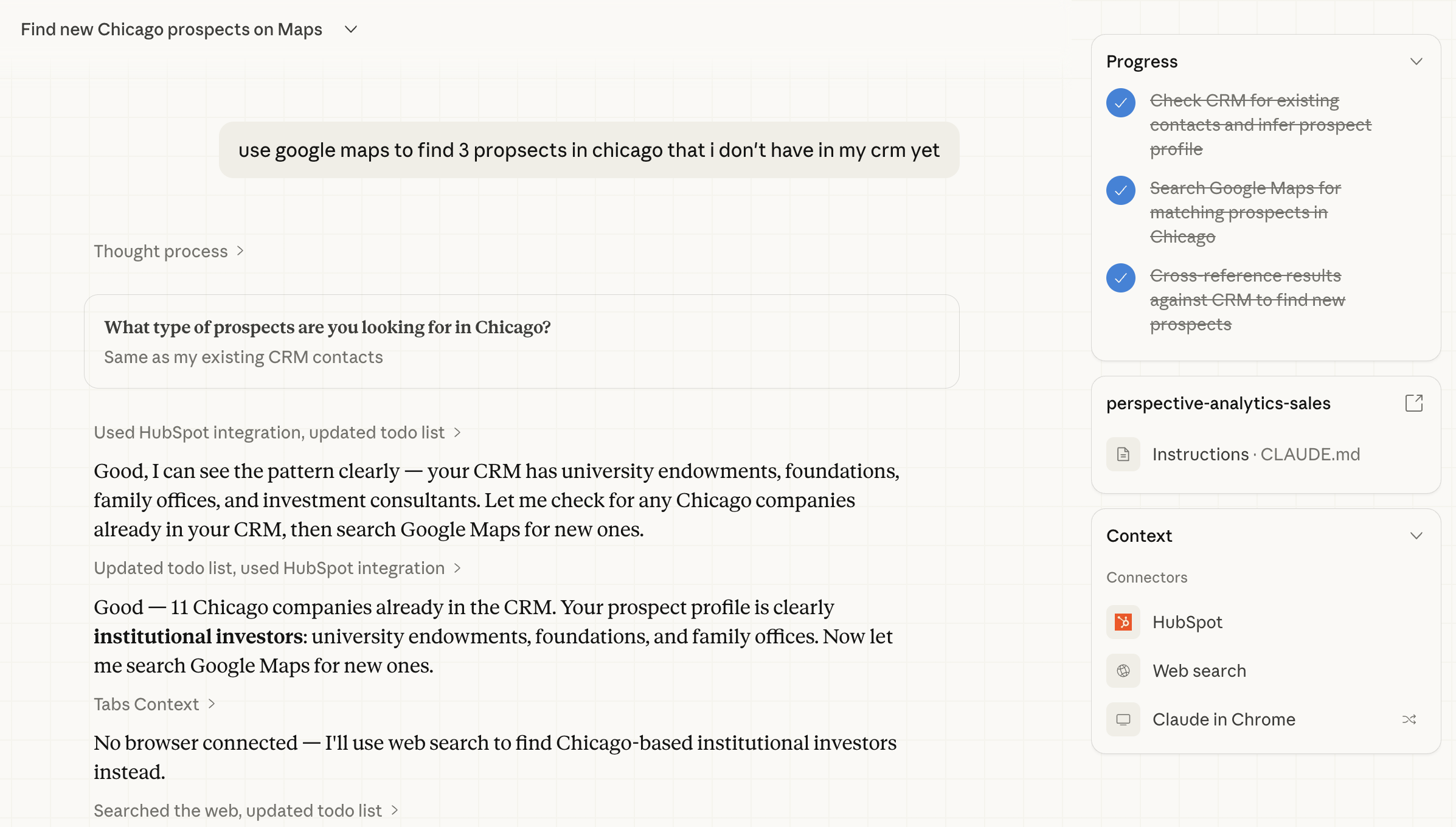
Real example: Claude finds new prospects in Chicago by checking HubSpot, cross-referencing the ICP, and searching Google Maps.
Connects to Your Stack
ZPT plugs into the tools your company already uses. No migration, no new software.